Medication and supplement inventory in IQSTAX
Keep medication and supplement supply in view.
One place for items and amounts
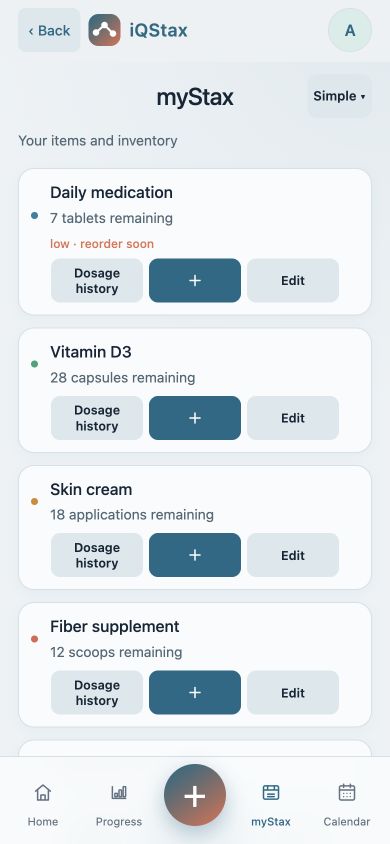
The myStax view brings tracked items and remaining supply together. Keeping an item name and its unit clear makes the inventory easier to interpret later.
Set up a starting amount
Add your item and enter the starting quantity with the matching unit. Use the fields available for that item; tablet counts and liquid or mass measurements are different kinds of records.
Review after logging
When using inventory deduction, review the remaining amount after saving a dose. Check the item’s history if the number is unexpected. A digital balance depends on accurate entries and does not measure the contents of a container.
Keep your records current
Compare the displayed amount with your actual supply when you add stock or correct an entry. Review low-stock information as an organization aid; it does not order refills or replace your pharmacy’s instructions.
Common questions
What is the difference between dose history and inventory?
Dose history records individual entries. Inventory records the supply remaining for an item. When inventory deduction is used, a dose entry can affect that supply, so check both after correcting an amount.
Can I use the same quantity unit for every item?
Use the unit that matches the item and its available fields. A tablet count is different from a liquid volume or a mass. Do not treat those quantities as interchangeable or use the tracker to decide a conversion.
Explore IQSTAX
Try the website demo, or view current app details and subscription information in your store.
By the IQSTAX team · October 21, 2026. Recordkeeping guidance, not medical advice. Features and screens may vary by platform and version.